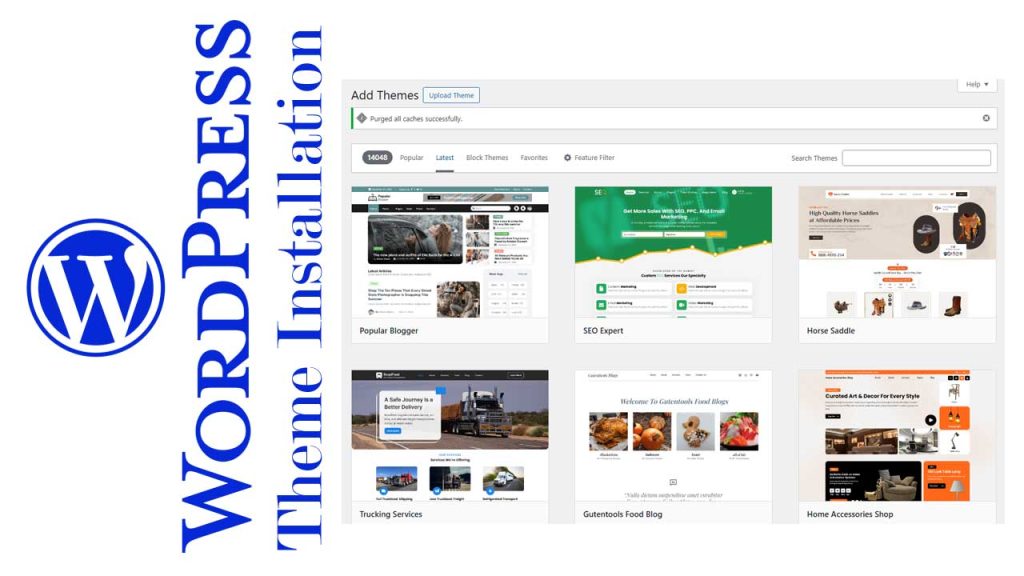
Introduction to Secure WordPress Theme Installation
The process of installing a WordPress theme is often perceived as a simple technical action, yet its implications for security, performance, and long-term website integrity are far-reaching. A secure installation is not merely a matter of uploading a file; it is an intentional, structured procedure designed to minimize vulnerabilities and ensure that the chosen theme functions as intended. An improper approach can expose the entire server environment to critical threats such as unauthorized access, defacement, data manipulation, or complete system compromise. Therefore, adopting a disciplined and security-oriented installation mindset is fundamental for maintaining a stable and trustworthy digital presence.
A secure installation requires thoughtful preparation, adherence to verified sources, and a strong understanding of licensing protocols imposed by theme developers. These elements collectively protect a website from malicious code injections, illegal modifications, and embedded backdoors commonly found in free or pirated premium themes circulating on the internet. As part of this introduction, the following foundational principles are essential for establishing a sound installation environment:
Core Principles of Secure Theme Installation
-
Authenticity of Source , Only themes obtained from verified developers or authorized marketplaces should be used to prevent exposure to malware, trojans, and phishing scripts.
-
Licensing Validation , Legitimate premium themes include license keys or verification tokens required for activation. These ensure authenticity and guarantee long-term updates from the developer.
-
Security-Oriented Workflow , Installation must follow a structured sequence that includes backups, compatibility checks, and secure file-handling practices to prevent data loss or system intrusion.
-
Awareness of Threats , Understanding the risks associated with free or pirated themes, including defacement, data theft, and server compromise, helps reinforce the importance of secure installation methods.
-
Commitment to Compliance , Respecting developer licensing terms not only ensures functionality but also minimizes ethical and legal risks associated with unauthorized theme usage.
Through this framework, a secure WordPress theme installation becomes more than a technical necessity; it forms the foundation of responsible website management and long-term digital resilience.
Pre-Installation Requirements and Technical Preparations
Establishing a stable and secure foundation before installing any WordPress theme is a critical component of responsible website development. Proper pre-installation preparation not only minimizes the likelihood of configuration conflicts but also significantly reduces security exposures that frequently arise from system incompatibilities or insufficient server hardening. The following preparatory measures provide a structured, academically oriented framework that ensures the installation process proceeds smoothly, safely, and in accordance with best practices.
Verifying Hosting Environment and PHP Compatibility
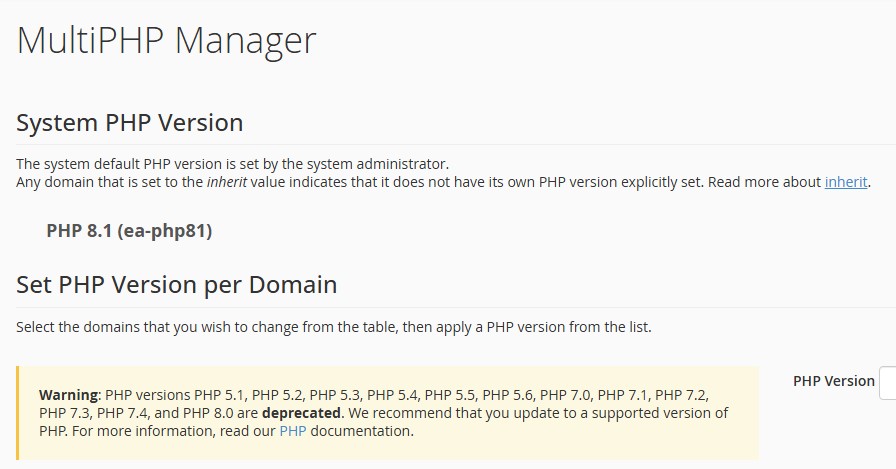
A WordPress theme can only function optimally when the hosting environment meets the technical standards required by both WordPress core and the theme developer. Failure to meet these criteria may lead to malfunctioning templates, fatal errors, or broken features during and after installation.
Key checks include:
-
PHP Version Compliance
-
Ensure the server uses the minimum PHP version recommended by WordPress (typically PHP 8.0 or higher).
-
Verify compatibility with the specific theme, as certain premium themes require higher versions for security methods or modern frameworks.
-
-
MySQL / MariaDB Compatibility
-
Confirm that the database engine is updated and meets WordPress core requirements.
-
Evaluate database performance settings such as query caching and storage engines.
-
-
Memory Limit and Server Resources
-
Increase PHP memory_limit to at least 256M for modern themes.
-
Ensure adequate CPU and RAM availability on shared hosting environments.
-
-
HTTPS and SSL Certification
-
Validate that the domain has a working SSL certificate to support secure theme features and API communications.
-
These verifications create a stable environment that reduces installation errors and supports long-term website performance.
Ensuring Database, File Permissions, and Server Settings Are Configured Correctly
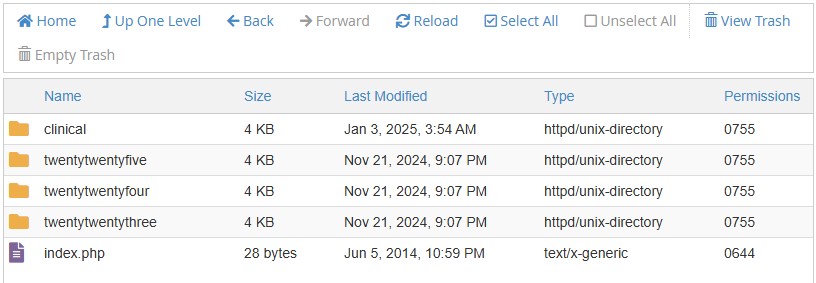
Incorrect file permissions or misconfigured server rules can lead to installation failures or, more critically, open pathways for unauthorized access. These settings play a fundamental role in safeguarding the integrity of the website.
Essential configuration tasks include:
-
File Permission Audit
-
Set folders to
755and files to644unless otherwise specified by the hosting provider. -
Disable directory listing to prevent information disclosure.
-
-
Validating Ownership and User Roles
-
Ensure proper ownership (e.g., www-data) to avoid restrictions in uploading or modifying theme files.
-
Restrict unnecessary SFTP/SSH access for security reasons.
-
-
Reviewing .htaccess or Nginx Rules
-
Confirm that rewrite rules for WordPress permalinks are functioning.
-
Apply security rules such as blocking XML-RPC or restricting sensitive directories where appropriate.
-
-
Optimizing Database Settings
-
Check table structures for corruption or inconsistencies.
-
Enable automatic backups in case a rollback becomes necessary.
-
Proper configuration ensures the server environment remains secure and prevents vulnerabilities during theme deployment.
Importance of Backups Before Any Theme Deployment
A comprehensive backup acts as the final line of defense against installation-related failures, theme conflicts, or unexpected security incidents. Without a valid restore point, recovery can become significantly more complex and time-consuming.
Critical backup elements include:
-
Full File Backup
-
Includes wp-content, theme files, uploads, and custom code.
-
Ensures that, if installation corrupts assets, they can be restored immediately.
-
-
Database Backup
-
Creates an essential snapshot of content, settings, and structural metadata.
-
Allows rapid rollback if the installation triggers database inconsistencies.
-
-
Verification of Backup Integrity
-
Test backup files to confirm they can be restored correctly.
-
Avoid relying on backups stored only within the same server environment; use off-site locations when possible.
-
-
Versioning and Documentation
-
Maintain documented logs indicating backup date, theme version, and pre-installation configurations.
-
By securing a full backup set, the installation process becomes far safer, enabling recovery in the event of conflicts, corrupted files, or cyberattacks.
Evaluating and Selecting a Safe WordPress Theme
Selecting a secure and reliable WordPress theme is a critical step in ensuring long-term website stability, performance, and data protection. A theme serves not only as the visual foundation of a website but also as a key structural component that interacts directly with core files, plugins, and server resources. For that reason, the evaluation process must be conducted with academic rigor, a security-first mindset, and an awareness of the substantial risks associated with unverified or pirated providers.
A professional selection process includes assessing authenticity, verifying licensing, evaluating coding standards, and understanding the potential dangers embedded in unofficial theme distributions. The following sections provide a structured and academically grounded overview of the essential criteria.
Risks Associated With Free or Unverified Themes
Free themes, especially those distributed through unofficial channels, often lack the security audits, code review processes, and long-term developer support that premium or verified themes receive. Such themes may appear visually appealing but frequently fall short in structural integrity and cybersecurity readiness.
Key risks include:
-
Absence of routine updates, leading to vulnerabilities that attackers can easily exploit.
-
Weak code quality, which may trigger compatibility failures or unexpected behavior.
-
Lack of professional maintenance, leaving security patches unaddressed for extended periods.
-
Hidden malicious code, placed intentionally in obscure theme files by unverified distributors.
From a security standpoint, using unverified free themes reflects a high-risk decision that compromises both the website and the hosting environment.
Threats From Pirated Premium Themes: Malware, Defacement, and Data Breaches
Pirated premium themes are among the most pervasive sources of WordPress-related cyberattacks. These “nulled” or cracked versions typically contain embedded malware, phishing scripts, or trojans that operate covertly within the server environment. Their intention is often to gain unauthorized access or to manipulate system functions for malicious activity.
Academic and industry analyses consistently identify the following threats:
-
Website defacement, where attackers alter visual components to display unauthorized content or propaganda.
-
Data theft, including customer details, login sessions, or confidential company assets.
-
Server-level compromise, allowing malicious users to create backdoors, override permissions, or escalate privileges.
-
Complete data deletion, where attackers wipe databases, files, or system logs to cause maximum damage.
-
Phishing and trojan injections, which remain hidden in the theme’s internal scripts to capture sensitive information.
Using pirated themes is not merely unethical, it represents a direct pathway to catastrophic website failure and long-term operational disruption.
The Role of Official Licensing in Security and Functionality
A valid license code is more than proof of purchase; it is a critical security mechanism embedded by theme developers to protect intellectual property and ensure proper functionality. Without an authentic license, many premium themes disable core features, restrict updates, or block installation entirely.
The importance of licensing includes:
-
Guaranteed authenticity, ensuring the theme originates from a verified and trusted developer.
-
Access to continuous updates, including new features, bug fixes, and security patches.
-
Vendor-level security reinforcement, where developers monitor vulnerabilities and deploy corrective measures.
-
Activation of full functionalities, since many premium themes lock essential components until valid credentials are provided.
-
Compatibility stability, supporting seamless integration with WordPress core and reputable plugins.
A website that relies on unlicensed themes inherently lacks structural integrity and operational reliability.
Verifying the Legitimacy of the Theme Vendor
Before adopting any theme, it is academically responsible to validate the legitimacy of its source. This prevents reliance on untrustworthy marketplaces and ensures long-term support availability.
Verification steps include:
-
Checking the developer’s official website, documentation, and update history.
-
Reviewing user feedback, ratings, and independent expert evaluations.
-
Evaluating support availability, such as helpdesk responsiveness and technical documentation depth.
-
Confirming marketplace credibility, especially when purchasing through third-party platforms.
-
Assessing transparency, including version logs, feature roadmaps, and security patch notes.
A legitimate vendor demonstrates consistency, technical competence, and ethical distribution practices, qualities essential to compliant content evaluation.
The Official WordPress Theme Installation Process
The official installation of a WordPress theme requires adherence to a structured technical workflow to ensure security, compatibility, and long-term stability. A theme is not merely a visual layer; it is a framework that interacts directly with the CMS core, database queries, and rendering engines within the hosting environment. Thus, a disciplined installation process prevents file corruption, performance degradation, and vulnerabilities commonly exploited by automated attacks. The following subsections describe the academically accepted procedures utilized by experienced WordPress specialists in professional environments.
Uploading and Installing Themes via the WordPress Dashboard
Installing a theme through the WordPress dashboard represents the most widely adopted method due to its efficiency and built-in verification mechanisms. This method allows the system to validate the .zip structure, identify missing dependencies, and prevent incomplete uploads that may compromise stability.
Standard procedure includes:
-
Accessing Appearance → Themes → Add New within the WordPress administration panel.
-
Uploading the official
.zippackage obtained directly from the verified theme provider. -
Allowing WordPress to perform internal structural checks, such as directory mapping, stylesheet recognition, and template hierarchy validation.
-
Confirming a successful installation message before proceeding to activation.
This method reduces manual error and provides an additional layer of integrity checking, which is essential for preserving site security.
Manual Installation Through FTP and Best Practices
FTP-based installation is often preferred in advanced technical environments, particularly when handling larger theme files or when server restrictions limit dashboard uploads. This method provides direct access to the file system, allowing the installer to verify folder integrity and ensure that no hidden or malicious files exist within the package.
Standard FTP installation procedure involves:
-
Connecting to the server using a secure protocol such as SFTP or FTPS to prevent credential interception.
-
Navigating to
/wp-content/themes/within the server directory. -
Extracting the theme package locally and uploading the entire folder without renaming or altering its internal structure.
-
Ensuring that directory permissions follow standard WordPress security recommendations (typically
755for directories and644for files). -
Returning to the WordPress dashboard to complete theme recognition and activation.
FTP installation demands attention to finer technical details, but it provides greater control over file validation and security, especially for users operating within customized hosting environments.
Activating the Theme and Confirming Structural Compatibility
Activation is not a single-step interaction; it is a multi-layer compatibility assessment. Once a theme is activated, WordPress initiates a series of internal processes that determine how the site behaves under the new structural hierarchy.
Key verification steps after activation include:
-
Confirming that the theme’s stylesheet (
style.css) and core template files load without errors. -
Evaluating layout stability within multiple devices and screen resolutions.
-
Checking plugin compatibility, especially for themes relying on page builders, custom post types, or proprietary frameworks.
-
Running browser and server-side error logs to detect deprecated functions or PHP conflicts.
-
Ensuring no missing template dependencies, such as header.php, footer.php, or functions.php misconfigurations.
This stage is crucial because even a correctly installed theme may generate inconsistencies if the hosting stack, PHP version, or active plugins are misaligned with the theme’s framework.
A proper WordPress theme installation is a methodological process requiring technical diligence. The official installation procedures, whether through the dashboard or via FTP, serve not only to deploy a design but to ensure operational security, structural integrity, and overall performance stability. Themes installed without adherence to these standards often become the entry point for vulnerabilities, operational failures, and long-term maintenance issues.
Integrating Theme License Codes and Verification Keys
The integration of license codes and verification keys represents one of the most critical phases in a secure and legally compliant WordPress theme installation. Modern premium theme developers embed proprietary validation frameworks to ensure that only legitimate buyers can access updates, security patches, and core functionalities. This process functions not merely as a commercial safeguard for the developer but also as an essential security mechanism that protects website owners from malicious code injections, unauthorized theme modifications, and long-term vulnerabilities.
Without a valid license key, the installation process may be restricted, essential modules may be disabled, and the theme may fail to receive critical updates, conditions which significantly compromise the structural integrity of a website. For this reason, the integration of genuine license credentials must be treated not as a formality, but as a fundamental component of a secure deployment workflow.
Understanding License Architecture Embedded by Theme Developers
Theme developers typically implement a structured licensing system designed to authenticate and authorize legitimate users. This system often includes:
-
Unique purchase codes tied directly to a buyer’s account.
-
API-based verification keys that communicate with the vendor’s authentication server.
-
Encrypted validation tokens embedded within the theme’s core files.
-
Automatic update gateways accessible only after successful license activation.
This architectural design ensures that only verified installations can receive real-time updates, bug fixes, and security enhancements.
Why Installation Cannot Proceed Without a Valid License Code
Academic and industry analyses consistently demonstrate that unlicensed themes significantly increase the probability of system compromise. Developers intentionally embed license-dependent checkpoints to prevent misuse and to ensure that the theme’s core functionality is delivered only in secure environments.
A valid license code ensures:
-
Full activation of the theme’s design and functionality modules.
-
Eligibility for ongoing updates and security patches.
-
Access to premium widgets, layout packs, and proprietary features.
-
Protection from tampered files commonly found in pirated versions.
If the license verification fails, the installation may halt, display warning prompts, or block configuration access until the user provides an authorized key.
Security Benefits of Proper License Activation
From a cybersecurity standpoint, license activation provides a defensive layer that significantly reduces the risk of website intrusion. Verified themes have a demonstrably lower exposure to malware, trojans, phishing scripts, or malicious code injections frequently found in pirated premium themes.
Licensed activation contributes to:
-
Protection against defacement attacks caused by compromised or modified theme files.
-
Mitigation of server-level threats, including unauthorized access, database breaches, and remote file manipulation.
-
Preservation of mission-critical website data, preventing deletion or corruption by malicious actors.
-
Long-term site stability, through authenticated updates and verified code integrity.
In sum, license integration is not merely a procedural step but a core requirement for maintaining the ethical, functional, and security standards expected in professional WordPress environments.
Post-Installation Configuration and Structural Optimization
Post-installation configuration represents a critical phase in ensuring that a newly installed WordPress theme functions as intended, maintains structural integrity, and operates within secure and optimized parameters. At this stage, the objective is not merely to make the theme visually appealing but to establish a technically sound foundation that enhances performance, accessibility, and long-term stability. Proper configuration also prevents conflicts between plugins, ensures consistent rendering across devices, and reduces vulnerabilities arising from default or unadjusted settings.
1. Essential Settings for Layout, Typography, and Navigation
Once a theme is activated, the foundational design elements must be configured systematically to achieve both aesthetic and functional coherence. This process ensures that the website maintains clear visual hierarchy, predictable navigation flow, and readable typographic structure.
Key configuration tasks include:
-
Adjusting global layout settings, such as container width, grid alignment, sidebar placement, and header architecture.
-
Configuring typography rules, including font pairing, base font size, line height, and heading styling for semantic consistency.
-
Setting up navigation menus, ensuring that primary, secondary, and mobile menus reflect an intuitive information structure.
-
Enabling responsive design features, ensuring that the theme adapts accurately to tablets, mobile devices, and various screen resolutions.
-
Verifying accessibility compliance, such as contrast ratio, alt-text readiness, and keyboard navigation support.
A strong emphasis on these elements not only enhances user experience but also aligns the site with modern SEO indicators, particularly Core Web Vitals and usability metrics.
2. Configuring Theme-Dependent Plugins Securely
Many professional themes require the installation of supplementary plugins to enable full functionality. These may include page builders, sliders, form systems, or proprietary enhancement modules. While these plugins expand features, they must be handled carefully to avoid performance degradation or security vulnerabilities.
Recommended best practices include:
-
Installing only required plugins explicitly recommended by the theme developer, avoiding unnecessary components that may duplicate existing functions.
-
Verifying plugin authenticity, ensuring all installations originate from trusted repositories or licensed sources.
-
Configuring plugin settings according to the theme’s technical documentation to avoid layout inconsistencies or shortcode errors.
-
Testing plugin interactions, confirming compatibility and ensuring that no plugin introduces excessive resource consumption or script conflicts.
-
Restricting administrative permissions, ensuring only authorized users can modify plugin settings or install additional modules.
Proper plugin configuration stabilizes the entire environment, reducing the likelihood of website breakage, theme malfunction, or exposure to security threats.
3. Removing Unnecessary or Vulnerable Plugins After Setup
Following theme installation and configuration, it is essential to conduct a systematic review of all active plugins. Excess or unmaintained plugins create significant risks, including slower loading times, orphaned files, outdated scripts, and exploitable vulnerabilities. A streamlined plugin environment is foundational to maintaining long-term website health.
Actions that should be performed include:
-
Deactivating and deleting plugins that duplicate functionalities already provided by the new theme.
-
Identifying outdated or abandoned plugins that no longer receive developer updates or security patches.
-
Reviewing plugin performance impact, particularly evaluating load time contribution, database queries, and script footprint.
-
Removing pre-installed plugins from hosting environments or previous themes that no longer align with the new structure.
-
Scanning for security risks, using reputable scanners to identify malware signatures, unauthorized scripts, or hidden backdoors.
This cleanup process enhances performance, reduces the attack surface, and ensures a stable integration between the new theme and the core system.
Security Risks of Improper Theme Installation
Improper WordPress theme installation poses substantial security vulnerabilities that can jeopardize the integrity of an entire website and, in severe cases, the server infrastructure hosting it. When themes are sourced from unverified platforms, installed incorrectly, or activated without proper licensing, the probability of malicious code infiltration rises significantly. This situation creates an environment in which attackers can exploit structural weaknesses, inject unauthorized scripts, or gain elevated access privileges. The consequences are often severe, ranging from data manipulation to complete system compromise.
How Defacement Attacks Occur Through Compromised Themes
Website defacement is one of the most common outcomes of installing unsafe or poorly maintained themes. Attackers often embed hidden scripts or backdoor access points within modified theme files, enabling them to overwrite website content and replace it with unauthorized material. This not only disrupts the site’s visual presentation but also undermines the credibility and professional standing of the website owner.
Common mechanisms that lead to defacement include:
-
Hidden malicious scripts injected into theme templates (e.g., header.php or footer.php).
-
Unauthorized file permissions that allow attackers to overwrite public-facing pages.
-
Unpatched vulnerabilities in outdated theme code.
In academic and professional contexts, such breaches are considered critical reputation risks, demonstrating a lack of administrative oversight and technical governance.
Potential for Data Theft, Unauthorized Access, and Server Manipulation
Pirated or improperly installed themes frequently contain embedded malware designed to exfiltrate sensitive data. These malicious components operate covertly, capturing login credentials, administrative passwords, database records, or customer information. Once attackers gain access to serialized data, they often escalate privileges, allowing them to manipulate files or gain control over the server environment.
Typical threats include:
-
Phishing modules designed to harvest user credentials.
-
Trojan-based scripts that transmit data to remote command-and-control servers.
-
Database injection pathways that grant unauthorized read/write access.
-
Malicious cron jobs scheduled to execute destructive commands periodically.
Such attacks represent substantial violations of privacy, often resulting in long-term operational disruption and legal liability.
Long-Term Consequences of Using Pirated or Modified Themes
While the immediate impact of compromised themes may be visible, the long-term consequences are often more destructive and financially burdensome. Websites using pirated premium themes are particularly vulnerable because these themes typically contain obfuscated code, unauthorized licensing bypasses, or embedded trojans designed to remain undetected.
Long-term risks include:
-
Permanent loss of critical data if attackers deploy commands to delete server files.
-
Degradation of SEO performance as search engines flag the site for malware or spam.
-
Blacklisting by hosting providers due to repeated security breaches.
-
Legal implications for using unlicensed software.
-
Inability to update the theme, resulting in outdated code and compounding vulnerabilities.
Moreover, the absence of a legitimate license key prevents security validation, version updates, and access to patch releases, conditions that substantially amplify vulnerability exposure.
Final Recommendations for Maintaining Integrity and Performance
Maintaining a secure and high-performing WordPress environment requires continuous discipline that extends far beyond the initial installation phase. A properly installed and licensed theme is only the foundation; long-term website integrity depends on ongoing monitoring, responsible updates, and adherence to security best practices. The following recommendations serve as a comprehensive framework to preserve structural stability, safeguard data, and ensure sustainable performance throughout the lifecycle of the website.
Continuous Updates, Monitoring, and Security Scanning
Routine maintenance is an essential component of responsible theme management. Themes, plugins, and WordPress core files must be updated consistently to prevent vulnerabilities that attackers may exploit. Regular monitoring also allows anomalies, such as unusual login attempts or unexplained file modifications, to be detected early.
Recommended actions include:
-
Performing weekly updates for WordPress core, themes, and plugins.
-
Enabling automated security scans using reputable security tools.
-
Reviewing server logs to identify suspicious activities.
-
Scheduling periodic malware checks to detect hidden scripts or unauthorized file injections.
-
Maintaining off-site backups to ensure rapid recovery should any incident occur.
These practices significantly minimize the risk of defacement, data breaches, or unauthorized server access.
Importance of Relying on Licensed, Verified Vendors
The long-term reliability of a WordPress installation is strongly influenced by the legitimacy of the theme source. Licensed themes not only provide official updates and technical support, but they also guarantee that the codebase remains free from malicious modifications, something pirated or unverified themes can never assure.
Critical considerations:
-
Only obtain themes from verified developers or recognized digital marketplaces.
-
Confirm that the license key is genuine, active, and compatible with the domain.
-
Ensure access to official documentation, update logs, and support channels.
-
Avoid nulled or modified themes, as they often contain embedded malware, phishing scripts, or hidden backdoors.
Establishing a relationship with authentic vendors ensures long-term stability and preserves the integrity of the entire hosting environment.
Long-Term SEO and Performance Benefits From Proper Theme Setup
A properly installed and licensed theme contributes directly to SEO efficiency and website performance. Clean code, frequent updates, and stable integrations bolster search engine visibility and improve user experience, factors that influence ranking longevity and domain authority.
Key benefits include:
-
Faster loading speeds due to optimized and uncluttered code.
-
Better indexing because of consistent updates and predictable structure.
-
Reduced downtime through reliable, maintained theme frameworks.
-
Enhanced Core Web Vitals performance, improving competitive SEO standing.
-
Increased trust signals to both users and search engines, supporting EEAT principles.
This synergy between technical stability and search performance reinforces the website’s credibility across all future content initiatives.
For readers seeking a fully secure, professionally managed, and academically precise WordPress theme installation, it is advisable to explore the following service page:
👉 https://wordpresswebsitelatenmaken.my.id/wordpress-theme-installation-service/
Those who wish to begin a direct consultation may reach out via WhatsApp using the link provided on the service page. Engaging with a certified specialist ensures that the installation, configuration, and long-term maintenance of the website adhere to the highest standards of security and technical excellence.

🌐 Your Expert WordPress Setup & Performance Optimizer
Hello! I’m Arifin, a seasoned WordPress Specialist based in Sidoarjo, East Java, Indonesia, dedicated to delivering fast, secure, and professionally installed websites.
Are you looking for a hassle-free launch or a significant performance boost for your WordPress site? With deep experience in both frontend theme implementation and critical backend server tuning, I ensure your project is built on a solid foundation, ready for success.
My Core Expertise & Services:
| Service Category | What I Deliver | Key Benefits |
| Premium Theme Installation & Licensing | Expert installation and configuration of premium themes (e.g., ThemeForest). I handle license activation, ensuring compliance and smooth functionality from day one. | Professional look, full feature access, and proper licensing setup. |
| Seamless Website Migration | Stress-free transfer of your complete website from one hosting provider to another, guaranteeing zero data loss (except emailing list) and minimal downtime. | Reliable move, ready for a new hosting environment. |
| Advanced Plugin Conflict Resolution | Troubleshooting and fixing complex plugin conflicts (like LSCache vs. WP-Optimize), ensuring all performance and utility plugins work harmoniously without breaking your site. | Optimized performance and site stability without costly errors. |
| Critical Security Implementation (SSL/TLS) | Setting up and enforcing SSL/TLS certificates to secure your connection, protect against hacking threats, and build user trust. | Enhanced security, improved SEO, and “secure” browser status. |
| Backend & Server Performance Tuning | Expert configuration of PHP settings (increasing upload size, enabling GZIP compression, adjusting PHP version) to ensure optimal server resource allocation and lightweight WordPress loading. | Dramatically improved website loading speed and reliability. |
| Hosting & Domain Management | Custom Email Setup: Creating professional domain-specific email addresses and setting up reliable email forwarders. Infrastructure: Managing custom data uploads via File Manager and creating subdomains. | Full control over your digital identity and development environment. |
Why Choose Me?
I go beyond simple installation. I deliver a fully optimized, secure, and ready-to-launch website. My commitment is to resolve the technical headaches, especially plugin conflicts and server-side performance issues, so you can focus purely on your content and business.
🌍 Global Reach & Support
I proudly serve your websites worldwide, supporting clients and projects from the US, Canada, Australia, Norway, Luxembourg, Netherlands, Croatia, Scotland, Dubai, Qatar, and many more international locations. Distance is not a barrier to achieving peak website performance!
📞 Ready to Boost Your Website’s Performance?
For immediate consultation and quick support, feel free to reach out directly via WhatsApp.
WhatsApp (Arifin): +62 838-3441-8700
⬇️ Click to Chat Now! ⬇️
Start Your Free Website Consultation
I’ve helped entrepreneurs, bloggers, agencies, and corporate teams transform basic WordPress installs into fully optimized, high-performing websites — without unnecessary complications or upsells. SEO isn’t guesswork for me… it’s architecture. Every setting has a purpose, every article is built to rank, and every site gets the foundation it deserves.
Outside of the keyboard, I share insights and professional journey through my LinkedIn profile:
(linkedin.com/in/shoumal-arifin-b432a3286) — feel free to connect if you like straightforward WordPress talk with a side of dry humor.
If you want a website that’s not just “installed” but intelligently engineered and future-proofed for search engines, I’m your guy. My philosophy is simple:
Good design makes a site look nice. Good SEO makes a site unforgettable.
Let me handle the complicated stuff so you can focus on what you do best, running your business.
Your website deserves more than a theme. It deserves an expert.
=============================================================